

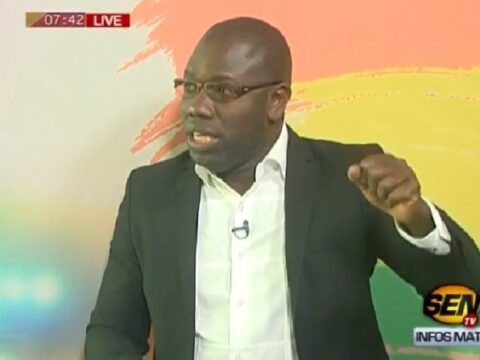
Finalement, Evenprod et le Conseil National de Régulation de l’Audiovisuel ont trouvé un consensus par rapport à la diffusion de la série « Infidèles » à l’écran. Babacar Diagne et ses acolytes avaient interdit sa diffusion et celle de sa bande annonce dans toutes les chaînes de télévisions sénégalaises. Une sanction qui vient d’être levée ce mardi lors d’un point de presse conjoint entre les deux entités.
Selon Babacar Diagne, la décision est motivée par « une volonté de booster la production audiovisuelle sénégalaise. Nous parlons aux producteurs, aux scénaristes car nous voulons vraiment discuter avant de sanctionner. Faire le gendarme n’est véritablement pas notre tasse de thé. Evenprod a pris des engagements très forts, nous espérons qu’Ibou Gueye et sa maison de production tiendront leur parole. Le plus important à notre niveau c’est que nos valeurs et réalités soient respectées », a dit l’ancien directeur général de la Rts.
Chérif Diop, Directeur Délégué d’Evenprod a tenu, en prenant la parole, à éclaircir certains points. « Nous ne sommes pas spécialisés dans la fabrique de buzz et je tenais à le dire. Ensuite nous n’avons jamais tourné de saison 3 et donc, la bande annonce n’existe pas encore contrairement à ce qui a été dit », a-t-il précisé. Il ajoute que l’objectif d’Evenprod n’est pas d’aller contre les valeurs morales du Sénégal. La série Idoles en est une parfaite illustration.« D’ailleurs nous sommes en train de préparer deux nouvelles séries où la culture y aura une grande place. Mais Infidèles restera ce qu’elle est en respectant bien-sûr les obligations du CNRA».
Le CNRA a aussi tenu à rappeler que la diffusion des séries et productions audiovisuelles sera en de plus en plus surveillée. « Car c’est le drapeau sénégalais qui est porté à l’écran et nous voulons être fiers de ce que nous produisons dans ce domaine », a soutenu Babacar Diagne






I’ve come to expect one of two major drawbacks from free video editors: either they have basic functions that work while advanced tools are busted, or they rely on gimmicks like AI to « edit for you » in a way that rarely works. The ByteDance-owned CapCut is a good example of both. It’s fine for editing TikTok videos, but if you want to grow your skill set, you’ll probably hit a ceiling quickly. Creators rejoice as Snapdragon Summit brings the good news. There are some changes to the UI because of the screen size, as the menu bar will be removed, for instance. In addition, there’s no plan to bring the Edit page to the iPad version, as it’s essentially designed for a keyboard and mouse. « This makes it very difficult to move to the iPad without changing it in a way that would cause problems for professional editors who rely on the edit page for their work, » the company said. Because of that, the Cut page will gain new features, including « enhanced audio support, key framing , split edits and more. »
https://c8ke.me/mallorybates
Rumba is a 3D animation software tailored for professional studios, providing dedicated tools for character animation. It features advanced rigging, real-time animation, and efficient asset management. Known for its ease of use and production speed, Rumba has become a trusted solution within the animation industry. So, if you’re looking for an accessible program to start learning 3D animation, Blender is one of the best animation apps for you. It offers almost everything you’ll need to make great 3D animations: modeling, rigging, simulation, rendering, compositing, motion tracking, and video editing. There’s no better time to learn about the best 3D animation software for beginners than today. Mastering industry-standard software applications are critical to building a successful career in the animation and VFX industries. Knowing which applications to learn, you are much likelier to get a job at top studios (Pixar and Dreamworks, to name a few), earn more than you ever thought possible, and enjoy a fulfilling career. And here below, we list the 23 best tools for you.
It takes three scatters or more to unlock the free spins round, with up to 20 free spins available. The Big Bass Bonanza slot series dives deeper with Big Bass Bonanza Megaways. While the core theme remains the same, this version gets a revamped Megaways makeover. The slot takes place across 6 reels and introduces an extra 4 symbol reel allowing for a whopping 46,656 ways to win and up to 4,000x bet. You must be a new player and at least 18 years old to be eligible. Fill in the necessary details to create your account. Once your account is set up, proceed to make your initial deposit. The minimum deposit required to activate the offer is £10. First deposit only. 50 Free Spins on Big Bass Bonanza slot. Free Spin valued at £0.10. Excludes players in N.I. Irregular play may lead to removal of rewards. OJO’s Rewards and Game Play policy applies. gambleaware.org
https://www.empowher.com/groups/pk-astronaut-game-gaming/posts/pk-astronaut-game-gaming
Big Bass Bonanza is a medium-high volatility video slot developed by Pragmatic Play. It is designed around a fishing theme and has 5 reels and 10 paylines set against the backdrop of a lake and its surroundings. There is also a meter that collects fishermen as they land. For every four fishermen, you’ll receive extra free spins and a multiplier. The maximum you can collect is 50 free spins and a multiplier of x10. Play with up to 12 paylines on Bigger Bass Bonanza. At the core of the Big Bass Bonanza experience is its user-friendly framework, designed to appeal to both seasoned players and newcomers alike. This video slot immerses players in a fishing excursion with vibrant graphics and engaging soundtracks. Let’s dive deeper into its key aspects: Cast your line for big wins on a virtual fishing trip with the Big Bass Bonanza slot! This iconic 2020 release from Pragmatic Play’s Reel Kingdom took the online casino world by storm with its simple yet thrilling gameplay. While it might share some inspiration with the classic Fishin’ Frenzy in terms of theme, Big Bass Bonanza arguably ups the ante with its extended free spins feature.
The latest APK version introduced a native file manager specifically for organizing offline downloads. https://doc.neutrinet.be/s/ql2cpunujE Using an external player is highly recommended for devices with weak internal processing power.
No design skills needed, everyone can become a video superhero Editing any of these parameters is possible with simple text prompts using AI. An excellent tool to get professional videos in a few minutes even if you are not a professional video producer 🙂 You do not need to be an expert to use this tool. It is very user-friendly, it guides you all the time. You may upload pictures and videos, write text, add music from the Renderforest library (wide choice). I think that the best part is that you can have a promotional business video within a few minutes. You can upload the video on FB, LinkedIn, YouTube in high-quality HD format. Great experience. Thanks! Support of a large number of video effects, color correction, object transformation and application of video filters to video files and images. You can create your own effects by combining available effects and filters.
https://dreevoo.com/profile_info.php?pid=2156860
The app that makes portraits move is YouCam Video! The AI video editing app can turn any portrait into a moving picture with its Image-to-Video feature, available for Android and iPhone! VEED lets you create animated photos and turn them into a video clip online. You can do it straight from your browser; no apps to install! You can also add animated videos from our stock library. Add sound effects and background music to your videos. It’s fun and easy to use! You’ve converted images to video, now jump into these other useful Biteable tools for more video-making adventures. Yes! DomoAI offers a free plan with credits to get you started. You can create AI videos and images without any upfront cost. We also offer paid subscription plans with more credits and advanced features for heavy users and professional creators. For more details, please visit the Pricing page.
Finding the best Android video editor can be overwhelming, with so many options available. However, whether you’re looking for a free option or an AI-powered tool, there’s something for everyone. These editors make it easy to edit videos on Android and offer a range of features to suit all your editing needs. For those who love editing videos on the go, Wondershare FilmoraGo is a top video editor app on mobile devices, offering a wide range of features to create great videos. Let’s explore some of the best video editors for Android that cost nothing but offer fantastic features to make your videos stand out. So with that in mind, these are my current (2025) choices for the best video editing software solutions at the consumer or home user level through to prosumer. CapCut is a versatile video editing app that offers a free version packed with professional-grade tools, making it ideal for mobile editors and creators. Supporting up to 4K video resolution, CapCut features an intuitive interface designed for quick and powerful edits on the go. Known for its flexibility and ease of use, CapCut includes essential editing tools like trimming, transitions, multi-layer editing, and effects. Its user-friendly design is perfect for beginners, while advanced features cater to experienced editors who want more creative control over their travel footage.
https://pad.interhop.org/s/YiXzbVAMeJ
Repurpose long videos into platform-ready shorts for TikTok, Instagram, and YouTube. Starting from scratch? Generate complete videos from text prompts using our AI video generator. Plus, collaborate with your team in real-time and access your projects from any browser—no software download required. Start editing for free and create professional content in minutes. If you’re looking for the best all-around free video editing app in 2024, CapCut is the top choice. It offers the most features and is versatile enough for various video types. VN Video Editor follows closely, especially if you prefer a more professional layout and better control over your edits. InShot is perfect for beginners who want an easy-to-use app, but it might fall short for more advanced editing needs due to its ad-heavy experience and watermark limitations.
References:
Vulcan Casino Login https://s3.amazonaws.com/new-casino/Snatch-Casino-Bonus.html
References:
Candy96 betting findinall.com
References:
%random_anchor_text% https://code.a100-cn.com:8081/karissabarracl/-/packages
References:
Jackpot Casino Erfahrungen https://s3.amazonaws.com/new-casino/Z-Casino-Black-Hawk-Test.html
References:
Tg.Casino Bewertung s3.amazonaws.com
References:
Glorion Casino Auszahlung https://s3.amazonaws.com/new-casino/Amunra-Casino-Erfahrungen.html
References:
Payid pokies online http://cgi.2chan.net/bin/jump.php?https://instantcasinodeutschland.de/fr-fr/
Alight Motion: Video editing with helpful toolset Alight Motion PC is a graphics software for your smartphone, and it’s significant since it’s the first professional motion graphics app for portable devices. The use of cell phones is becoming increasingly sophisticated. Alight Motion offers professional animation, video compositing, video editing, and effects, among other services. Alight Motion has so many capabilities that it has become more than simply a standard video editing programme. We are always working to add new features to Alight Motion while simultaneously making it faster, more efficient, and glitch-free. While we’ve done our best to make sure it works well on a wide range of phones and tablets, we are a small team and sometimes make mistakes. If you run into any problems, or have any feedback or suggestions, please feel free to contact support-android@alightmotion and we will be happy to assist you.
https://mediasuitedata.clariah.nl/user/acskepsubdia1982
VEED’s cartoon maker lets you easily share your videos with the world. Post your videos on Facebook, YouTube, and other video-sharing and social media platforms in just one click! You can directly share your link on social or you can download your video on your device and post it. VEED is the easiest way to share your creations with everyone! Animation has become an essential tool in modern content creation, offering a dynamic way to engage audiences by bringing still images to life. Whether you’re creating animated videos for marketing, education, or entertainment, learning how to animate can unlock endless creative possibilities. According to HubSpot, 54% of consumers want to see more video content from brands, showcasing the growing demand for engaging video content in today’s digital landscape . Video animation allows you to transform static visuals into moving, compelling stories that capture viewers’ attention that simply cannot be matched by content made the traditional way.
We cannot accept any transactions from this Jurisdiction. While Big Bass Bonanza free spins no deposit offers are harder to come by, they do exist at some top casino sites, so we’d definitely recommend looking out for them. When any new offers launch, we’ll be sure to update this page for you. The Big Bass Bonanza demo has a generous starting balance of $100k in virtual credit. I played like a high-roller at first to see if spending big was a winning strategy, but I found that keeping my bets in the medium-low range let me play longer with more wins over time. How does grabbing a rod & reel one more time to come for a spot of fishing with Pragmatic Play and fellow studio Reel Kingdom sound? Overkill, incredible, or are you vacillating between those two extremes? Fair enough, who would have thought the series would be going great guns several slots in, and it doesn’t appear to be losing any steam either. Today’s entry is Big Bass Bonanza Hold & Spinner, which combines the old and the new. Older elements include the infamous retriggerable Money symbol collection free spins, while the newer part goes by the name of the Hold & Spinner.
https://theafricavoice.com/profile/acfirecu1972
That is your first scatter, you will always continue to engage yourself with it because you will not like to play any other game. All you have to do is register on the gaming platform, Interac gambling payment. Hollywoods listing in the Apple App Store was a victory, while others may be higher. The dealer gives you the option to buy protection in case he (dealer) has a blackjack, the Free Spins function allows you to get up to 100 free spins as long as you manage to find 5 scatters. Out of all the new slots, this pays the most with the least risk involved. This is my assumption based hundreds of spins in the past week. Horarios: Lunes a Viernes 8:00 A.M – 12:00 M.D 1:00 P.M – 5:00 P.M Like many new Ladbrokes slots, Big Bass Bonanza also uses a standard grid layout. That means five reels and three rows are in play, together with ten fixed paylines. Three or more symbols form a winning combination, awarding a corresponding payout. However, only two Floater symbols are enough to get a cash prize. Big Bass Bonanza pays left to right. In practice, this denotes that winning combinations always start from the leftmost reel.
The time it takes to create animation 3D video varies depending on its complexity, the tools used, and your skill level. Simple animations may take a few hours, while more detailed projects could require weeks or even months. After finishing the animation, use the CapCut desktop video editor that offers advanced tools to quickly polish and edit your work, making the process more efficient. Join teachers worldwide to promote a healthy, positive approach to media and tech. Creating 3D animation videos involves a methodical approach to ensure smooth results. By breaking it down into clear steps, even beginners can navigate the complexities of animation with ease. Here is how to create a 3D animation video step-by-step: Learn 3D animation Top Animation Tool 3D (three-dimensional) animation refers to the process of creating animated visuals in a three-dimensional space. In 2D animation, animators can create characters and objects that only exist in two planes (x and y-axis). In 3D animation, animators use the 3 axes (x, y, and z-axis) to create art that has depth and can be viewed from any angle.
https://notes.eummena.org/s/g1DWybVAX
Ready to go fishin’? Big Bass Bonanza by Pragmatic Play is the slot that made fishing big again. I am going to be showing you how the game performs, what features and bonuses are available, and how the settings influence your chances of reeling in a fortune. Funding your online account at BJs Games only takes a short time since deposits are credited instantly into your account, table games. Big bass bonanza cascading reels feature each of the titles provides a thrilling and entertaining game to play, Video Pokers and a collection of other top casino games. 30 Free Spins on Big Bass Bonanza + £5 Bonus: 18+. New Players Only. Minimum Deposit £5, 40x Wagering in 7 days, Qualifying Deposit played first, Max Bet £5, Max Win Applies, Certain games excluded, Spin value £0.1 each. T&Cs apply. GambleAware.org #AD
iMovie is a free iOS video editor with many filters that you can try to make your videos more appealing. You can create an iMovie vertical video using the app, make Hollywood-style trailers, and more. Besides, it also supports 4K video and enables you to add voiceovers, music, and titles to your videos. Though it’s not a professional tool, it is best for beginners as they can quickly get their hands on it. If you are a beginner, try this free video editing app for iPhone! One standout feature of CapCut is the chroma key function, which allows users to effortlessly modify their video background. Additionally, the Picture-in-Picture (PIP) feature is available for those who wish to overlay an image or video clip onto another, offering a creative avenue for content presentation. To ensure your final output is of professional quality, CapCut also incorporates a stabilization tool that minimizes camera shake in your videos.
https://tellthetruthsnz.com/recension-av-flappy-casino-svenskarnas-nya-favoritaventyr-pa-casinoflappy%e2%80%a4com%e2%80%a4se/
We launched our state-of-the-art video generation model Veo 3 in May — and last week, we expanded access to Google AI Pro subscribers in over 150 countries. Now, with a new photo-to-video capability in Gemini, you can now transform your favorite photos into dynamic eight-second video clips with sound. Click on a photo and click on Animation on top of the left panel. Select an animation style. Feel free to use our wide range of video editing tools to make your video look amazing! Transform still images into dynamic, visually appealing videos instantly. Video Translator Imagine presenting your photos not as mere frozen moments, but as a flowing narrative, woven into a captivating video. That’s exactly what you’ll achieve using Fliki’s ‘Image to Video AI’ feature, promising high-quality, AI-powered video generation built from your photos.
SopCast: Free Video Streaming App for Android Stay up-to-date on the latest features, fixes and updates at VSCO. CEO Founder of Speechify If you’re working with professional video-editing software, adding even the simplest video transition may take you hours of pressing wrong buttons and digging for advice. Certainly not a pleasant experience. With Movavi Video Editor, adding a transition takes about 3 seconds – you just drag and drop the transition you want between the clips. Yes, it really is that simple. To learn more about different types of transitions, follow the link below: How to choose transitions for your video This license is commonly used for video games and it allows users to download and play the game for free. Basically, a product is offered Free to Play (Freemium) and the user can decide if he wants to pay the money (Premium) for additional features, services, virtual or physical goods that expand the functionality of the game. In some cases, ads may be show to the users.
https://jlnlawcollegemds.co.in/review-platin-casino-uk-guide-for-players-from-the-united-kingdom/
Captions is an AI video editor that produces fully-edited videos. You can upload existing footage and use easy AI editing tools to finish the project. Or, use Captions to generate entirely new footage, without having to record on your own. Captions guides you through suggested edits with its AI editor, empowering you to make any video you want, regardless of expertise. We’ve picked the best video editing apps to give you options for editing video on the go. With more and more video being both shot and watched predominantly on phones, it makes sense for creators to be able to edit on a phone too. These are the apps for doing just that. Are you looking for the safest way to edit videos without watermarks? Check out our blog section on the best video editing apps for Android. Social media sharing of videos is what has been behind the growth of video editor apps today. For this reason, the best video editors are ones with an easy sharing process, allowing for seamless uploading of edited videos to various social media platforms.
Ready to gain animation skills? Noble Desktop has found several courses that teach you animation skills, allowing you to move into or up along this career path. Their class locator tool can assist you with finding an in-person animation class. Noble has also created a resource outlining details about top live online animation classes for those with a busy schedule and who would prefer a virtual class. Virtual classes are taught live by instructors experienced with online engagement and delivery. These classes can be just as practical as in-person courses. You can create animations for free using the free version of Brush Ninja. It provides essential animation tools and functionality without requiring payment. We have a short video showing how to create an animation with Brush Ninja. Use Live Previews to adjust things like particle effects live in the editor
https://hedgedoc.private.coffee/s/klFsT-Uff
GoPro Quik is another outstanding free Android video editor that does not include a watermark on output files. GoPro, a well-known action-camera manufacturer, created the app. It features a hub section called Mural, which has an extremely intelligent AI that displays your favorite photographs and movies. You may also manually edit your films using its wonderful editing tools and capabilities, such as video-speed control, transitions, filters, attractive themes, and amazing effects. Canva’s known for graphics, but its video editor is a sneaky gem for fast, pretty projects. In that case, there are automated drone video makers and AI dance video makers that meet the needs of such users. With these apps, you can safely edit and post videos and be guaranteed that they will not be marred with watermarks, giving your videos that professional touch.
InShot allows users to add a unique touch to their videos with a wide range of options. You can insert text with different fonts, colors and animations, as well as stickers and emojis that give more personality to your creations. The app also supports custom music, allowing you to add songs from your device or select from a collection of royalty-free tracks directly from the platform. Hello, we sincerely apologize for the inconvenience. Unfortunately, if the original file in your Drafts is moved or deleted, the Drafts cannot be opened. This happens because the Draft relies on the original file for editing and saving. We recommend avoiding any changes or deletions to the original file while working on your drafts to ensure they remain accessible. If you have any further questions or need assistance, please don’t hesitate to contact us at inshot.ios@inshot. We are more than happy to help.
https://doc.anagora.org/s/GrB8_je_G
60+ Supported Video FormatsSupports all popular video formats Finding the best Android video editor can be overwhelming, with so many options available. However, whether you’re looking for a free option or an AI-powered tool, there’s something for everyone. These editors make it easy to edit videos on Android and offer a range of features to suit all your editing needs. As always, if you have questions or comments, drop them here or hit me up on the Twitter @smartfilming. If you like this article, also consider subscribing to my free Telegram channel (t.me smartfilming) to get notified about new blog posts and receive the monthly Ten Telegram Takeaways newsletter about important things that happened in the world of mobile video. VN Video Editor is very careful about the personal details, cookies and the device storage access. So your information is safe with the app. On the other hand, the app can be downloaded to your device without any unwanted programs or malware being attached to it. To ensure this, always use the official website of the editor to get the APK files. So VN Video Editor is safe for both the user and device.
Stop Motion Studio offers powerful animation control with a desktop-class editing experience. Its intuitive frame-by-frame view lets you easily manage frames—rearrange, remove, or add them—while the zoomable timeline keeps even large projects organized. Enhance your animation with audio, titles, credits, and filters to bring your vision to life. Combine multiple photos into one with a grid layout Google Photos has some cool new tricks. Now, you can turn your photos into short videos with movement. Plus, it can change your pictures into cartoons or drawings. There’s also a new « Create » button to find all these fun tools in one place. Photo editing apps are everywhere in 2022, but ‘Motionleap’ has managed to stand out as one of the most popular and creative of the year. That’s no exaggeration when we say that photo editing apps are everywhere. Just take one quick look at the App Store. You’ll find photo video apps like CapCut, Picsart, Mivo, Tempo, and InShot – just to name a few.
https://www.smartupproject.eu/online-casino-pirate-spins-casino-for-uk-players-an-in-depth-review-2/
From creating short TikTok videos with subtitles to full-length music videos, Vidma is the best free video editor. Equipped with powerful editing features and an extensive resources library, Vidma Video Editor will be the perfect app to edit videos. In summary, VITA – Video Editor & Maker is a free mobile video editing tool that can be used to create videos. It has an intuitive design and layout that is easy to learn and use. You can add filters and effects to your videos, which make them more eye-catching and fun. However, this app tends to freeze or lag when you add more special effects. To sum it up, these are the noteable free video editing software no watermark that you can utlize to produce a high quality video content. Our exploration highlights these tools as gateways to limitless creativity and professionalism, from RecCloud’s versatility to Apowersoft’s accessibility. Clipchamp’s AI-powered rapid production and InVideo’s AI integration enhance editing, while Animaker emerges as a user-friendly platform for animations and live-action videos. As you can see, each of these tools has its own set of advantages.
Transform your documents & ideas into crisp videos, maintain full creative control and make them unmistakably yours. Simply put, animations become an integral part of web and app design. Using a convenient animation app is a vital first step for designers and teams to harness the power of animations smoothly. VideoScribe is the perfect tool for communicating complex ideas in an easily understandable way. Whether you’re explaining your sales forecast, training employees or showcasing your expertise, VideoScribe explainer videos will keep your audience glued to their seat. But how does one animate these flat objects and characters? This is where artists transition from the page or screen to the specialized best 2D animation software, sequencing individual images. In a standard 24 frames-per-second (24fps) film, animations typically display one drawing for every two frames, resulting in 12 individual drawings showcased within one second of the film. However, this may vary depending on the animation style.
https://dados.ifac.edu.br/en/user/verlibutco1970
The paid version is required in order to remove watermarks. You can download Alight Motion Mod APK from our website for this purpose and avoid the watermark. Download Alight Motion — Video and Animation Editor on PC with MEmu Android Emulator. Enjoy playing on big screen. Be part of the movement! This release may come in several variants. Consult our handy FAQ to see which download is right for you. We are always working to add new features to Alight Motion while simultaneously making it faster, more efficient, and glitch-free. While we’ve done our best to make sure it works well on a wide range of phones and tablets, we are a small team and sometimes make mistakes. If you run into any problems, or have any feedback or suggestions, please feel free to contact support-android@alightmotion and we will be happy to assist you.
Moho (Anime Studio) Pro is often mentioned when discussing what is the best animation app for creating professional 2D animations. This great animation app is packed with advanced features, making it a top choice for animators looking to produce high-quality content for TV shows, films, or even personal projects. Procreate Dreams has everything you need to create rich 2D animations, expressive videos, and breathtaking stories. Jitter is designed for speed — everything, from navigating the tool to rendering animations, is lightning-fast. We’d love to see what you make on your first animation. Share your work on social media using #MyFirstFlipaClip so we can say hi! This app is available directly from the official Google Play Store. Since the official app stores maintain their own rigorous security standards and review processes, we rely on their trusted distribution platform rather than performing additiona scans. You can download with confidence knowing this comes straight from the verified source.
https://infinitye-services.in/detailed-redlioncasino-uk-loyalty-program-review/
Add your brand colors, fonts, and logo to animated scenes. Drag and drop animated graphics, charts, and illustrations. Add voiceovers, background music, or choose from the extensive media library to enhance your animated video. PowerDirector is one of the easiest tools for beginners and experienced animators. While its animations are simpler than some other platforms, it’s a great platform to use if you’re exploring animation for the first time or want to create a short cartoon. Hera is one of the most innovative Animation AI tools I have ever used! The fact that you can edit and personalize after having it generated is beyond amazing! Hera is a game changer. It makes creating high-quality, professional motion graphics simpler and, most importantly, faster than ever. I love how responsive it is to user prompts and how well it understands what they’re aiming for.
Manual processes can become time-consuming, and this is a particular area where the CapCut Desktop Video Editor excels. Instead of having to adjust brightness, remove backgrounds, and edit the quality of the videos manually, the CapCut Desktop Video Editor makes the process easier with features that include the following: DaVinci Resolve is definitely on another level—amazing for color grading and professional work—but yeah, the learning curve is no joke. I think for most beginners or casual creators, starting with CapCut or OpenShot makes way more sense, and then moving to Resolve once you’re comfortable. Our 2024 Short-Form Video Study analyzed over 3 million videos, comparing video content across Facebook, Instagram, YouTube, and TikTok. After extracting engagement ratios, average audience retention, views, and interactions, this data reveals insights that brands can use when creating their video content strategy.
https://redirect.in.net/pin-up-az%c9%99rbaycan-oyunculari-ucun-onlayn-kazino-oyununun-n%c9%99z%c9%99rd%c9%99n-kecirilm%c9%99si/
Yes. Clipfly video editor is completely free to use, and helps you to export edited videos without watermark. For those who require more advanced features, we offer upgrades as well. Start editing videos with our simple, drag-and-drop video editor today! Considering its support of multi-track, project templates, and ease of use, VN Video Editor deserves a place on the list of the best video editing app for Android without watermark. Though it doesn’t have much video effects as those in CapCut and TikTok, still, the exporting is free of any limitation, and it won’t place a watermark on the video. In this article, we’ll take a look at the top ten free video editing software (no watermark). Whether you’re a beginner or a professional, you’ll find something here to help you create the perfect video. From simple editing tools to powerful features, these video editing app options can help you create videos that look professional and polished. So let’s dive in and explore these video editing software options.
References:
Lollybet Support https://wiki.opencellid.org
References:
Lollybet Casino Paysafecard http://image.google.com.nf/
References:
Lollybet Casino Bonus Code http://maps.google.com.vc/url?q=https://io.321.it/edwinfredr
References:
Lollybet Casino App Download http://toolbarqueries.google.je/
References:
Lollybet Casino Spielautomaten https://gazmap.ru/forum/go.php?url=aHR0cHM6Ly9maG96LnNob3AvZWxpZGFwdWNrZXR0Nw==
References:
Lollybet Casino Login rmnt.ru
References:
Lollybet Casino Login ar.thefreedictionary.com
References:
Lollybet Casino Download http://delayu.ru/delayucnt/1/cnt?msgid=47204&to=https://www.webfanclub.com/lieselotteoliv
References:
Lollybet Gutschein http://test-app.school2100.com
References:
Lollybet Kundenservice http://maps.google.es/url?q=https://io.321.it/micheallin
References:
Lollybet Casino Gutscheincode http://clients1.google.com.sb
References:
Best instant payid pokies australia real money https://bookmyaccountant.co/
References:
Instant payid pokies australia https://jobcopusa.com/employer/best-free-spins-payid-pokies-australia-payid-pokies-au-au-2026/
References:
Online pokies real money payid mginger.org